Free. Private. No subscription.
A free debt payoff app for your iPhone.
Compare payoff methods, see your debt-free date, and track every payment privately. No account or bank linking.
No account · No bank linking · No tracking · iOS 18.2 or later
Choose the right workflow
Best debt payoff apps and free planners, ranked
The best debt payoff app is the one whose platform, price, data requirements and payoff methods fit the routine you will maintain. These three options are ranked by a specific use, with the checked facts compared below.
- 01
Debtless
Best fit for a completely free, private iPhone plan with no account or bank linking.
- 02
Undebt.it
Best fit for browser planning and a wider set of payoff-order choices.
- 03
Debt Payoff Planner
Best fit for an account-based plan with manually recorded payments.
Facts checked October 23, 2026 on each product's primary pages. “Not stated” means the checked page did not provide the fact.
| Compared field | Debtless | Undebt.it | Debt Payoff Planner |
|---|---|---|---|
| Supported platforms | iPhone, iOS 18.2 or later | Web browser; installable on iPhone and Android | Not stated on the checked page |
| Free and paid structure | Every feature is free; no paid tier | Free planner; Undebt.it+ is $10/year | Free plan; Pro from $2/month |
| Account required for compared workflow | No | No for the one-off calculator; yes to keep a tracking plan | Yes; account creation is the first setup step |
| Bank linking | Not required or available; manual entry | Not required; optional paid sync through SimpleFIN or YNAB | Not available; payments are entered manually |
| Payoff orders | Avalanche, Snowball, Cash Flow, Custom | Snowball, Avalanche, Hybrid, Cash Flow Index, Highest Monthly Payment, Highest Credit Utilization, Highest Monthly Interest Paid, Custom | Avalanche, Snowball, Custom |
Try it now
See your own payoff date before you download.
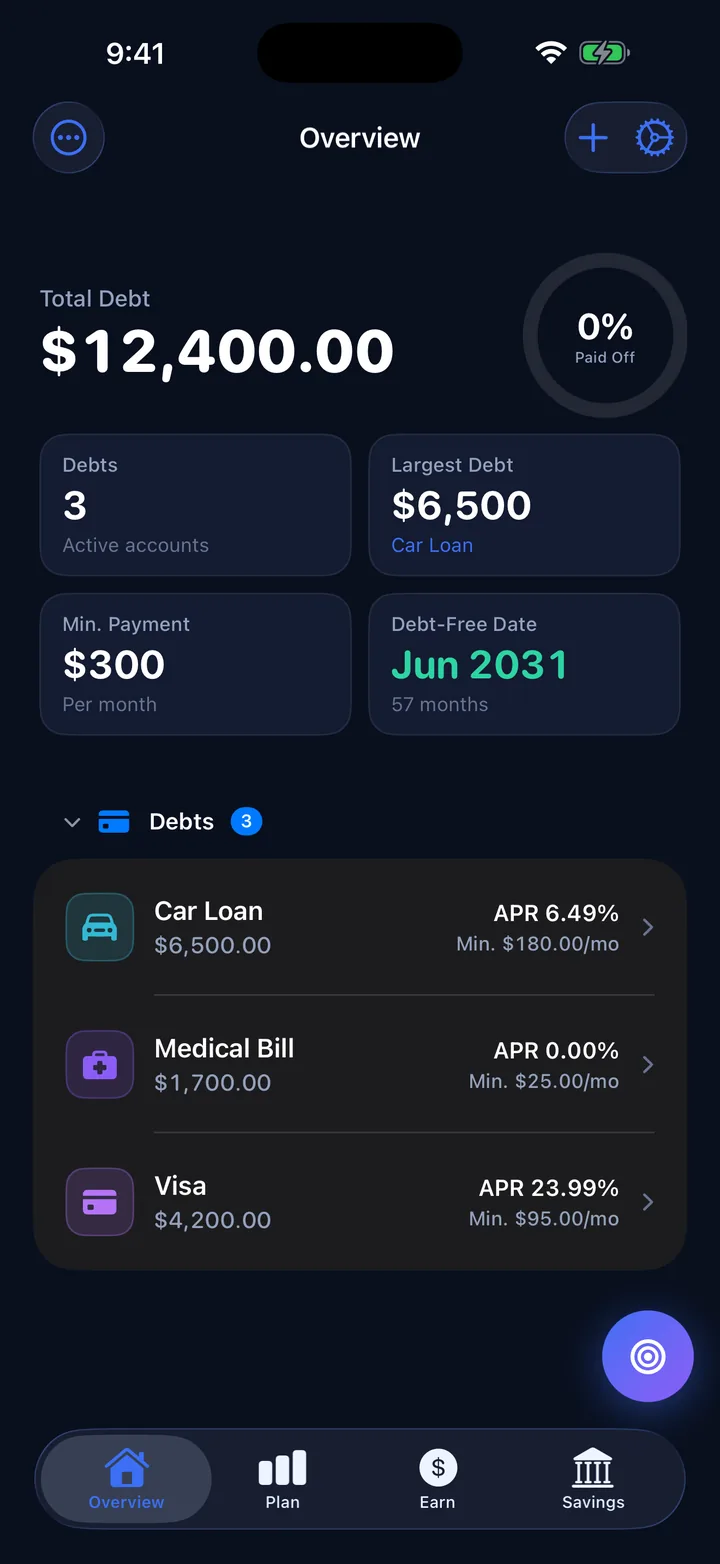
This runs the same month-by-month math as the Overview screen above. Enter your balances, APRs and minimums, add what extra you can pay, and compare Avalanche, Snowball and paying minimums only. Nothing you type leaves your browser.
| Plan | Debt-free | Months | Interest | Total paid |
|---|
Month-by-month payoff schedule
| Month | Extra target | Paid | Interest | Balance left |
|---|
Want more debts or a dedicated page? Use the full debt payoff calculator.
What Debtless is
The best debt payoff app is one you can keep current and trust with your financial details. Debtless is a free iPhone debt payoff planner that tracks balances, compares payoff methods and projects a debt-free date without an account or bank connection.
How it works
Three screens between you and a payoff date.
Step 1
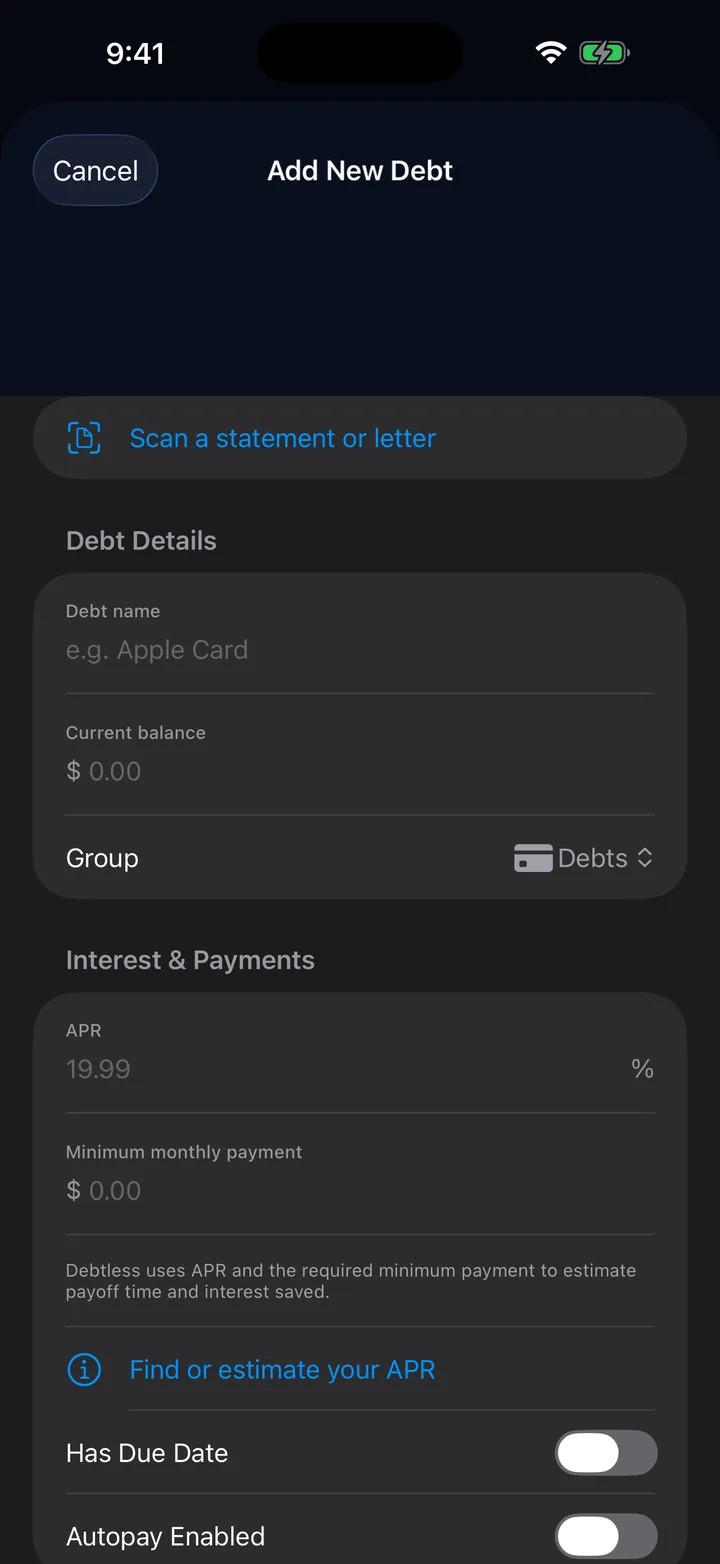
Add your debts
Type in a balance, APR and minimum payment, or point the camera at a statement and check each field before you save. Cards, car loans, medical bills, student loans, money you owe your brother. If you owe it, it goes on the list.
Not sure the list is complete? Use your free credit reports to find accounts before you build the plan.
Scanning runs on your phone. Nothing is uploaded.
Step 2
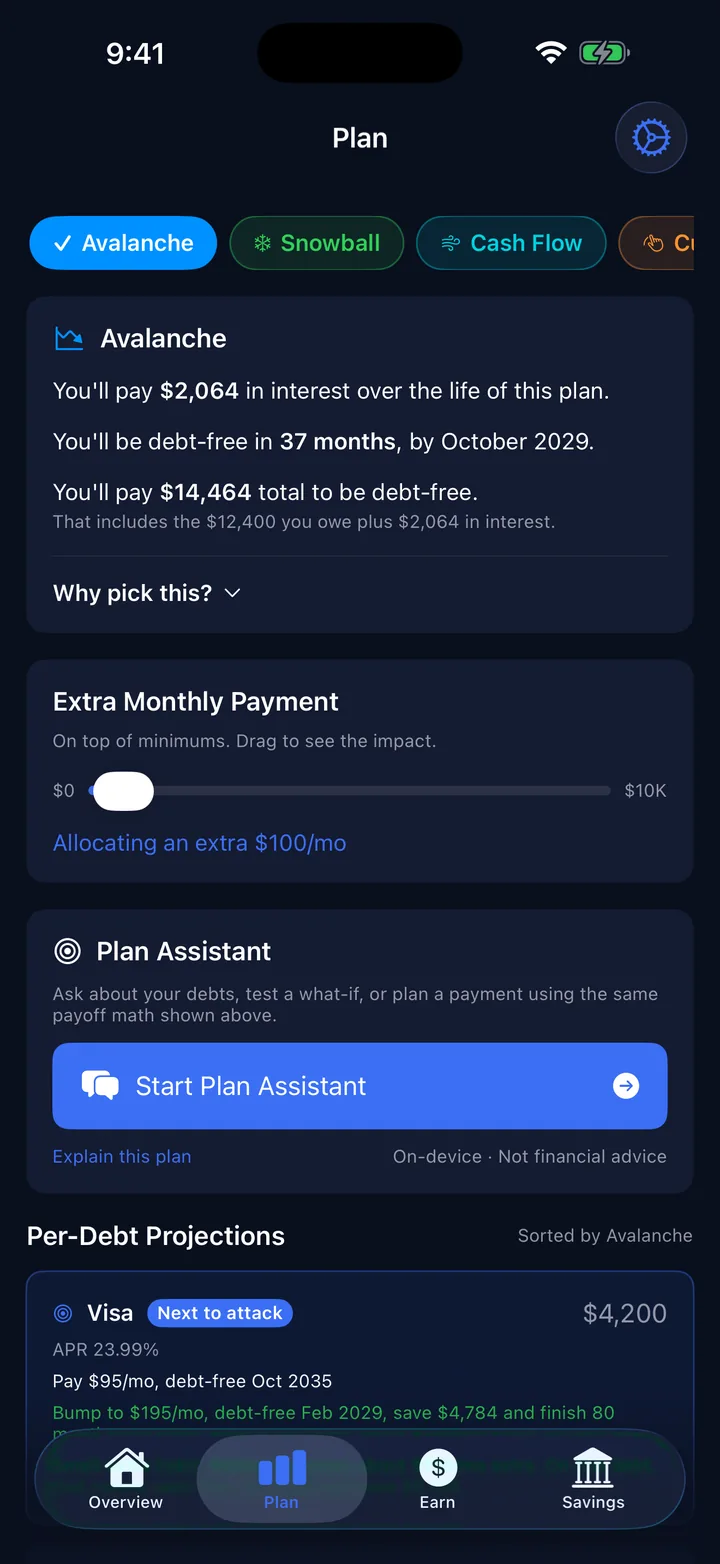
Pick a payoff order
Debtless runs every method on the same monthly budget and shows the debt-free month, the interest and the total you will pay. Drag the extra payment slider and the dates update as you go.
Projections are estimates from the numbers you enter. Your statements are the final word.
Step 3
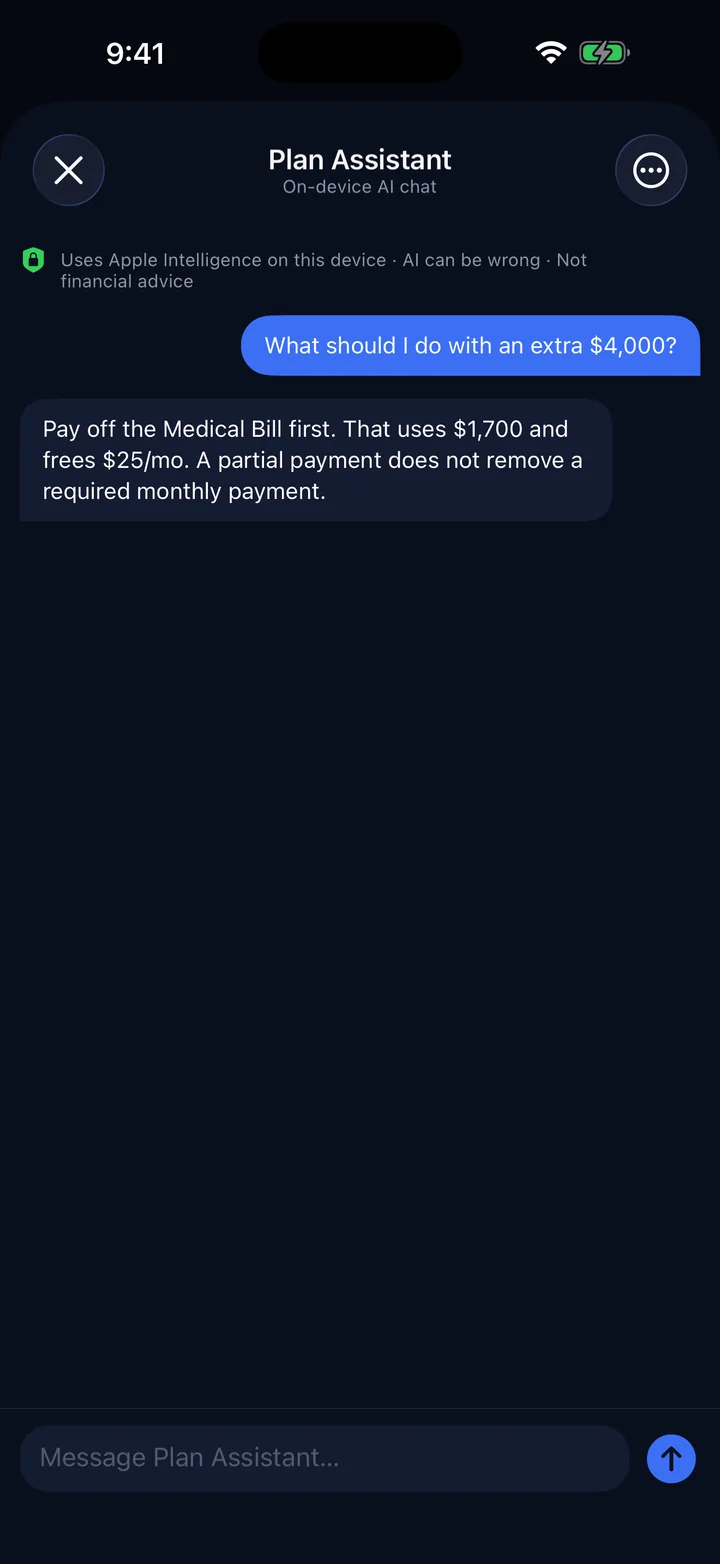
Ask the Plan Assistant
On iPhones with Apple Intelligence you can ask things like “What should I do with an extra $4,000?” The answer is built on the math the app already ran, and the chat never leaves your phone.
It can be wrong, and it is not financial advice. Check anything important against your statements.
Payoff methods
Four ways to aim your extra payment.
Every method pays all your minimums first. They differ only in which debt gets whatever is left over.
| Method | The extra goes to | Pick it when |
|---|---|---|
| Avalanche | The highest APR. | You want to pay the least interest. |
| Snowball | The smallest balance. | Closing an account soon will keep you going. |
| Cash Flow | The debt that frees the most monthly payment per dollar. | Money is tight and you need breathing room. |
| Custom | Whatever order you set. | A promo rate is ending, or one debt just bothers you more. |
Want the long version? Read snowball vs. avalanche with a worked example.
Price and privacy
Everything is included.
There is no paid tier. Debtless has no subscription, no in-app purchases and no ads, and it never asks you to make an account or connect a bank.
Your debts, payments and Plan Assistant chats live on your iPhone. You can export them to CSV or erase them from Settings whenever you like. Read the privacy policy.
If it helps, an honest App Store review is the only thing I ask for.

Guides and the Journal
Reading for the next decision.
Debt payoff calculator
Enter your debts and compare snowball and avalanche dates in your browser. CalculatorCar payment calculator
Estimate a monthly payment from an amount financed, or work backward from a target payment. GuideSnowball vs. avalanche
Where an extra $100 goes under each method, with a worked example. GuideHow to build a payoff plan
List what you owe, find your extra payment and choose an order. GuideTrack debt without bank linking
How manual entry works and what stays on your device. Getting startedHow long does it take to pay off $10,000 in debt?
The months it takes at different payments and rates. Payoff methodsThe cash flow payoff method
Free up minimum payments first when the budget is tight. Credit card debtDaily periodic rate: how card interest adds up
Why a 24% APR is charged a little every day. Loans and billsA debt collector called: what to do first
What to ask for before you agree to anything.FAQ
Questions people actually ask
Do I need to connect my bank?
No. There is no bank linking, no Plaid, and no sign-in account. You type or scan in your debts. The core ledger and generated requests stay on your device.
Can I track Affirm, Klarna, Upgrade, or other loan accounts?
Yes, add them as debts manually or scan a statement. Automatic Plaid-style linking is not in the app today, which keeps the privacy story simple: no bank connection and no credentials.
What's the difference between avalanche, snowball, and cash flow?
After the minimums are covered, avalanche sends your extra money to the highest APR and snowball sends it to the smallest balance. Cash Flow goes after the debt that frees up the most monthly payment for each dollar you put in, which helps when money is tight. Custom is whatever order you choose. Debtless runs all of them on the same budget so you can compare the dates and the interest.
What does the Plan Assistant actually do?
On compatible Apple Intelligence devices, it explains payoff methods and scenarios using the app-calculated math from the debts you entered. Questions are processed on-device. It is a planning and education tool, not a financial adviser, and does not provide financial advice.
Is my data private?
Yes. Your debts, payments, Plan Assistant history, statement processing, and generated requests stay on your device. There is no Debtless cloud sync, user account, or network AI fallback. Full privacy policy.
Is every feature really free?
Yes. Debtless has no subscription, in-app purchase, paywall, advertising, or paid feature tier. If it helps, the only thing I ask is an honest App Store review.
Why does this exist?
I built it because the other debt apps either nagged me or buried the one number I actually cared about: when am I free. So I put that number at the top of the screen and made everything else get out of the way.
Android?
Not yet. Solo dev, one app at a time.
Is there a debt blog?
Yes. The Debtless Journal at debtlessapp.com/blog has free articles on payoff methods, credit card interest, loans, collections and budgeting, and each article cites its sources.
What should I look for in a debt payoff app?
Choose an app whose payoff methods, data requirements and price fit the routine you will actually maintain. Debtless is a completely free iPhone option with Avalanche, Snowball, Cash Flow and Custom plans, and it requires no account or bank connection.
Which debt payoff app works without linking a bank?
Debtless works without linking a bank. You enter debts manually or scan a statement on your iPhone, and no account or bank connection is required. Undebt.it works without a bank login and offers optional paid bank sync. Debt Payoff Planner does not connect to your accounts; you record payments manually.

Find out when you will be done.
Add your debts and see your date. Free on iPhone.